GTA 6 Impound Guide: Get Your Car Back and Keep Stolen Cars
Quick answer: Find your impounded personal car in the Personal section of the map. Use ScooterBros when available or recover it from the lot yourself. Register a stolen car to make it recoverable; an unowned car is lost if destroyed.
Check the map’s Personal section first. A car marked as impounded is held at a lot; it is not the same as a destroyed car. Your next step depends on whether you have unlocked the phone recovery service and whether you want to attempt to recover its trunk contents too.
Get an impounded car back
Section titled “Get an impounded car back”- Open the map and use the Personal index to locate your registered vehicle.
- If ScooterBros is available on your phone, select the vehicle and inspect its Retrieve option. Check the quoted price before accepting: retrieval and the base service rate can be separate charges.
- If the service is unavailable, or you want to recover the car yourself, go to the marked lot. Find an entrance, reach your car and leave before police identify you.
- Check your stash separately. Being reunited with the vehicle does not guarantee that every bag remains in its trunk. Confiscated items may be in a nearby police vehicle.
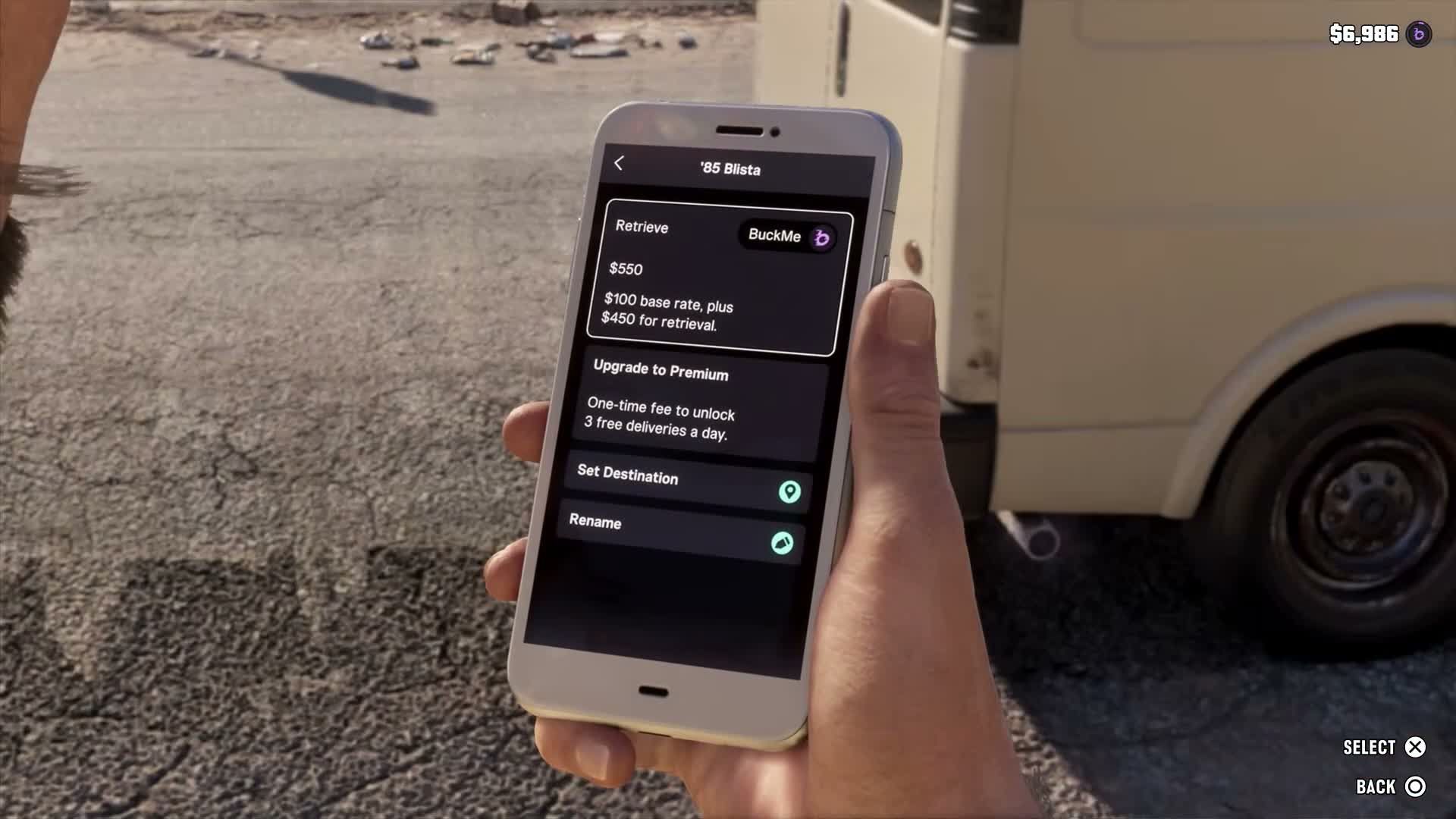
Do not spend money on repairs simply because a car is missing. Locate its status first. A recovery request costs money; stealing it back risks another police pursuit. Choose with your current cash and wanted situation in mind. For ways to earn the fee, use the money guide.
Keep a stolen car as your own
Section titled “Keep a stolen car as your own”A vehicle you happen to be driving is not automatically your personal vehicle. Registration is the step that makes the difference.
Drive an eligible car to a Pay ‘n’ Spray, find the registration option and inspect its price. Story progress controls which vehicles can be registered, especially those with Standard or Advanced Trackers. If the option is unavailable, continue the relevant car-theft story missions rather than assuming the vehicle is permanently yours because you parked it.
Both Jason and Lucia can have a personal ride. Additional garage space allows more registered vehicles to be stored; use the phone service to switch between stored cars when available. The missions and chapters list helps locate the relevant story stage.
Missing, impounded or destroyed?
Section titled “Missing, impounded or destroyed?”| Vehicle situation | What to do |
|---|---|
| Registered car, location unknown | Find its marker in the map’s Personal index |
| Registered car impounded | Check phone retrieval or recover it at the marked lot |
| Registered car destroyed | Check your unlocked repair/recovery contact or phone service |
| Unowned car parked nearby | Return to its last marker; store or register it before treating it as a permanent ride |
| Unowned car destroyed | It cannot be recovered; trunk contents are lost too |
Parking an unowned vehicle in a safehouse space or garage can keep it around, but it does not grant the recovery protection of registration. Before taking a favorite car into a dangerous mission, register it and store anything you cannot afford to lose.
If you are choosing a special car to keep, see the Paul Walker car location. For selling cars instead, the car resale guide explains buyers and tracker restrictions.
Frequently asked questions
Where is my impounded car in GTA 6?
Open the map and look in the Personal section of its index. Use your vehicle marker to find the lot holding it.
Can I get an impounded car delivered?
When the service is unlocked, use ScooterBros on your phone and check the retrieval price for that vehicle. You can also try recovering it from the lot yourself.
Can I keep a stolen car?
Yes. Register an eligible car at a Pay 'n' Spray after the relevant story unlock. Tracked vehicles may need further progression. Registration costs depend on the vehicle.
Can I recover a destroyed unowned vehicle?
No. Registration matters: a personal vehicle can be recovered, while a destroyed unowned vehicle is lost along with its trunk contents.
Related pages
- GTA 6 Bowling Alley Safe Code: Kingpin Bowling Safe (0300)
- GTA 6 Chapter 3 Missions: Tits Ass Drug Money, All 26
- GTA 6 Cocaine Flamingo Locations: How to Spot Them and Where
- GTA 6 GitHub: Leonida Project, Repository and PC Status
By GTA 6 Wiki Guide team · Last checked 2026-11-24.
 GTA 6 Wiki Guide
 is an unofficial fan site and is not affiliated with or endorsed by Rockstar Games. Game names, trademarks and screenshots belong to their respective owners.